Ever wanted to view list of currently opened TCP/IP and UDP ports on your computer with relative ease? CurrPorts, a small utility reveal all the detailed information regarding currently opened TCP/IP ports.
For each port in the list, information about the process that opened the port is also displayed, including the process name, full path of the process, version information of the process (product name, file description, and so on), the time that the process was created and the user that created it.
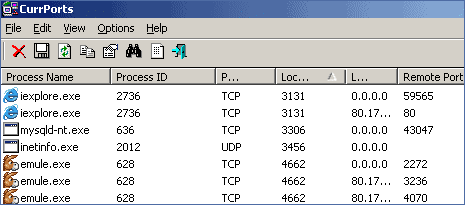
It also allows you to close unwanted TCP connections, kill the process that opened the ports, and save the TCP/UDP ports information to HTML file , XML file, or to tab-delimited text file. CurrPorts also automatically mark with pink color suspicious TCP/UDP ports owned by unidentified applications.
Download CurrPorts, a standalone executable utility that does not require any installation process or additional DLLs. It works under Windows NT, Windows 2000, Windows XP, Windows Server 2003, And Windows Vista.
