Add Firefox to jumplist on Windows 7 taskbar

 Filed As:Firefox, Software, Tips, Windows 7
 ADVERTISEMENTS


Jumplists is an interesting and very useful feature in Windows 7 operating system. A mouse hover over application button on the taskbar pops-up a box with quick access features, tabs and options of that specific application. Jumplists works like charm for Internet Explorer in Windows 7 but not is same for Firefox browser.
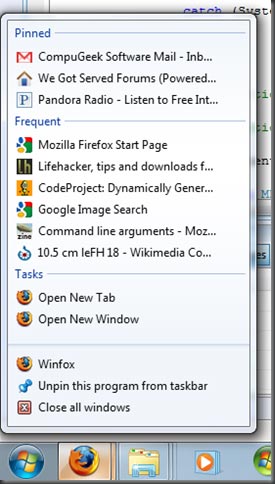
firefox-jumplists-support

Firefox users can add jumplists support using Winfox program. After the install, you can quickly access websites and tasks currently opened in Firefox browse in one view as a result of jumplists support for Firefox. As seen in screenshot, you can quickly view pinned, frequent and tasks easily. Download WiniFox



By Davinder on Sunday, November 15th, 2009

Share & Spread: Digg | Delicious | Share |
Loading


▼ Comments

One Response to “Add Firefox to jumplist on Windows 7 taskbar”
  1. nicholassimon says:

    If you are interested in (or already have) Windows 7 then it is worth reading this comprehensive post for just about everything to do with Windows 7 here:
    ninjarabbits.blogspot.com/2009/11/hopefully-very-comprehensive-guide-to.html

▼ Add a Comment

Have your say, add a comment using following comment form. If you want an image to show with your comment, go get a gravatar!