If Google understand your website and its content very well, be sure to get tons of traffic from Google Search. Here ‘understand’ is referred to how well your website is indexed by Google. In case your website or weblog is indexed well, your weblinks will rank higher and your website should receive more traffic from Google Search.
Confirm your website details on Google Search
Website publishers should always confirm, if there website or blog is listed with Google Search. So questions arise, how to check if Google know about my website? Well this is really easy and can be done using Google Search itself.

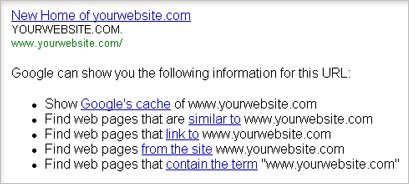
What additional details means to webmaster
Google’s Cache show snapshot of website homepage as seen by Google at that given moment. It generally shows an older webpage as caching takes some time. Similar to, shows weblinks or websites that have similar content or topics being discussed.
Link to show webpages linking the website in focus. While from the site show all the pages that have been indexed by Google (important!). Contain the term shows all those weblinks that have same term (website name) somewhere.
By using above Google command you can surely know more about how Google is viewing your website and its content. In case results are disappointing – don’t be dis-heartened, submit your website to Google using Google Webmaster Tools to have a brighter picture in near future.
