 Here is a situation as explained by Justin Watt, you come across some interesting stuff and want to copy it. So first you copy the text and then flip back to copy actual URL, continuing this ordeal.
Now you can easily make life easy by using following FireFox extension for the process of copying HTML links:
1. Copy as HTML Link by Justin Watt – It creates an HTML link to the current page using the selected text and copies it (into the clipboard) for pasting into other applications like Blogger, WordPress, Movable Type etc. This allows you to copy ‘Text or label’ of the link and actual ‘Hyperlink or URL’ in the same go, very handy indeed.
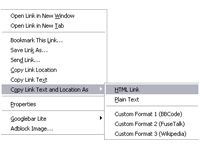 2. CoLT 2.3.0 by Jonah Bishop – Another similar Firefox extension for the same. CoLT makes it easy to copy either a hyperlink’s text or both the link and the link’s text (in a format you specify).ÂÂ
CoLT adds two menu items to the browser’s context menu, both of which are only visible when right-clicking a hyperlink.
Two very handy extensions to make process of copying links on the fly. Will surely save some good amount of time, what say? [via]
