 Chat Rooms is very common feature of Yahoo Messenger, hey… but what about Google Talk. Well, it seems Google is not interested in adding new features or update Gtalk.
But, there is an alternative way to add chatroom to Google Talk and enjoy Chatting. This can be easily done using ‘PartyChat’
PartyChat is like a group chat, a persistent chat-rooming for Google Talk. Here is the procedure for the same:
1. Login into Google Talk.
2. Add any of this to contact list: partychat@gmail.com or partychatN@gmail.com (N can be a number from 0 to 9 )
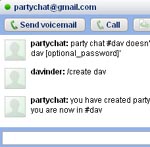
3. Now you need to create a chat group using command: /create movies
4. For others to join this, use command: /enter movies To exit from this use command: /exit movies
You can be in as many as 11 chats, one for each chat username. If 11 is too few for you, then let me know. You can also password protect chat group, here is command to be used while creating group: create/ movies password
You can read FAQs about this great feature. If you feel lost, type command for help: /help
LIST OF IMPORTANT COMMANDS
- /create chat_name [optional_password] – creates a new party chat. If you provide a password, then other users must give this password to enter the chat.
- join chat_name [password] – join an existing party chat. If the chat has a password, you must give the password to enter.
- /status – display the party chat name and your alias
- /list – list the current members of the party chat you are in
- /exit – leave the party chat you are currently in
- /whisper name message – send a private message to another user
- /help – offer some instructions on how to use PartyChat and directs users to /commands
- /commands – displays this menu
This has been developed by Akshay Patil, who actually works at Google. You can read more at his blog Techwalla.
