Gradient images are often used as background images on webpages to spice up the look. If creating gradient images in Photoshop if too much of task, then checkout free application “Gradient Studio”. It allows you to generate gradient images of different colors and styles in few simple clicks.
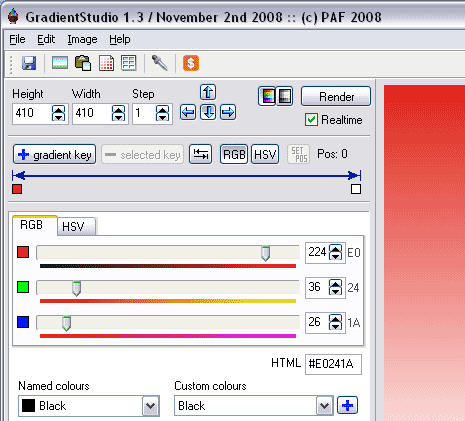
Generate Gradient Images
1. Download Gradient Studio [800K] & install the application.
2. Launch the application to create gradient images.
3. Select the width & height of gradient image.
4. Also select direction of gradient reflection by clicking arrows.
5. Move the slider to adjust RGB and HSV color values.
6. Goto File > Export > Image to save gradient as JPG / BMP image.
You can also export and save color information of any gradient created using this application. It also has option to save gradient image in HTML table format. One easy to use free application to quickly generate cool looking gradient images.
