 Taskbar can be annoying at times. Either you get to stare it all the time or use flip-flop auto hide feature. When default auto-hide feature is ON, taskbar shows up as soon mouse cursor is moved over taskbar position.
In case you find this annoying and want to FULLY tame youre taskbar then check out small utlity Push to show. Using this utility, taskbar will only appear when WIN key is pressed.
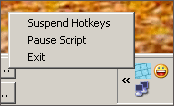
It is a small exe file and hence does not require any installation. After download, double click to activate this utility. You can control it from a small icon in the system tray. You can configure two options:
- Pasue the script.
- Suspend Hotkeys.
Now, taskbar will only appear when Win key is pressed. As soon Win key is released taskbar will vanish. Easy and very basic way to tame your taskbar.
Click here to download Push to Show – This utility was posted in response to request “Taskbar Displayed Only On
