 Web browser is very important while accessing or sending information on the internet. Besides images, we tend to type a lot. Some text is mis-spelt and one spends lot of time in manually correcting it. How about getting automated spell check for your browser?
Firefox users already have number of options to check spelling real time in the browser, for example Addon Spellbound. But what about Internet Explorer users?Well no worries, they also have option for a free addon to get real time in built spell check facility in IE.
IESpell is a free Internet Explorer browser extension that spell-checks text-input boxes on a Web page. It should come in particularly handy for users who do a lot of Web-based text entry (Web mail, forums, blogs, diaries).
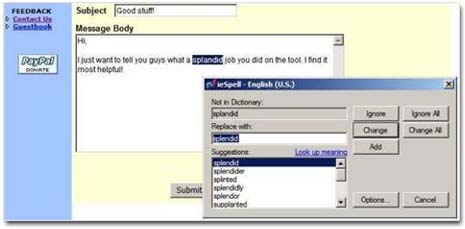
Even if your Web application already includes spell-checking functionality, this utility is faster than a server-side solution. You also get to store and use your personal word list across all your applications instead of having to maintain separate ones on each application.
IESpell: Click here for more information & Download
This less than 2MB software can get you spell check facility in Internet Explorer. No wasting time in correcting errors, correct spellings on the fly with IESpell.
