Watch HTML5 videos in full screen mode in Firefox

 Filed As:Firefox, Tools, Video Tools
 ADVERTISEMENTS


For starters, HTML5 is a new tag that can be used to embed and display audio – video content on webpages without any need for separate plugin support like Adobe Flash. As a result, you can watch Youtube, DailyMotion videos embedded with HTML5 tag without Flash player installed on the computer. Newer version of Firefox 3.5 comes loaded with HTML5 tag support.
html5-videos-full-screen-firefox-addon

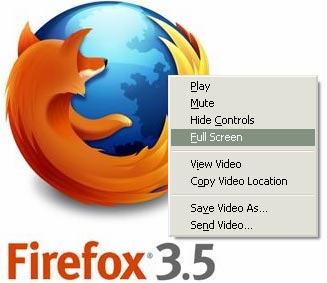
Now you can watch HTML5 videos in full screen using new Firefox addon “full screen video”. After the install, it adds a new menu option “fullscreen”. While video is playing, just right click and then click on fullscreen option to view HTML5 video in full screen mode. Download Full screen video firefox addon, very handy to view HTML5 video in full screen mode. Since HTML5 is evolving, don’t expect super smooth results – nice beginning though!



By Davinder on Monday, July 6th, 2009

Share & Spread: Digg | Delicious | Share |
Loading


▼ Comments

2 Responses to “Watch HTML5 videos in full screen mode in Firefox”
  1. nasek says:

    As a result, you can watch Youtube, DailyMotion videos embedded with HTML5 tag without Flash player installed on the computer.

    • nasek says:

      That’s not completely true. Firefox 3.5 doesn’t come with native support for flash of any kind, then you simply can’t wach youtube videos with the video tag, the videos must be coded in the free theora/ogg video format.
      Dailymotion has a lot of many videos already coded in both, flash and ogv.
      Unfortunately the ogv ones are coded in 320×240px only. I hope this will help you.

▼ Add a Comment

Have your say, add a comment using following comment form. If you want an image to show with your comment, go get a gravatar!