Are you headed off on a big trip? Want to share your excitement about a favorite sports team’s recent championship? Inviting your friends to a party you’re having tonight?
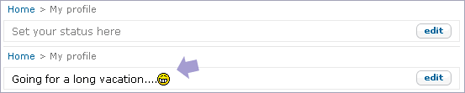
Well, now you can let all your Orkut friends know about your ‘Next big thing in life’ using Orkut Message status. As shown in image above, just describe what is new with you and select corresponding smiley and you are all set.
To use Orkut status message, go to profile page and click on edit button next to “set your status here”. Type whatever you want to appear. Now your Orkut pals can get latest about you in a simple and quick way! [via Orkut Blog]
