Many of us have more than one Gmail account for different personal and professional email needs. Ideally, one would login – logout from one Gmail account and then login – logout into other Gmail account. This is boring routine and takes lot of time. Gmail Notifier can make this little interesting and very quick. It allows you to check emails from upto 5 Gmail accounts in one interface.
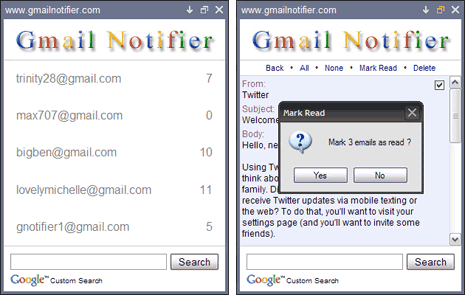
Gmail Notifier Features
1. Alerts for emails from multiple Gmail accounts (upto 5).
2. Shows counter with number of unread email messages.
3. It gives sound and tray icon alerts from new messages.
4. Read email header and body within Gmail notifier window.
5. You can also delete emails and mark as read.
6. Support for mailto links, Google Apps & UTF-8 emails.
Related – Gmail email Notifier, Windows & Mac desktop apps
Gmail Notifier is a free application that offer easy and simple way to stay updated with multiple Gmail accounts. Never miss new or unread email messages from different Gmail accounts. Download Gmail Notifier
