Cut Mp3 songs to make ringtones, cutter software

 Filed As:Audio Tools, Software, Tips
 ADVERTISEMENTS


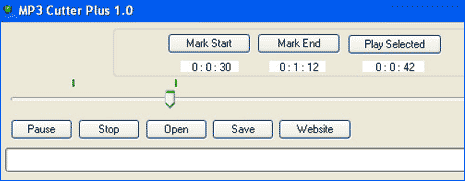
MP3 Cutter Plus is a free and very simple utility to cut any mp3 song in your collection. It is ideal to cut N snip any Mp3 song and use it as your ringtone. You can also use it to build collection of music pieces from downloaded songs. To get started, open any Mp3 song in this utility.
mp3-cutter-plus-software

Then select the start and end point in the song – you can move the slider to fine tune the start end points in the selected song. Click on ‘play selected’ button to preview the selected part of the song. When all OK with the selected part of Mp3 track, hit the save button.

Clip created using this software has similar quality to original Mp3 song. Download Mp3 Cutter Plus and create ringtones on the fly.
[Another Ringtone Maker: Make Ringtones with Audiko]



By Davinder on Monday, March 9th, 2009

Share & Spread: Digg | Delicious | Share |
Loading


▼ Comments

19 Responses to “Cut Mp3 songs to make ringtones, cutter software”
  1. Sammy says:

    how comes it says AVS music demo after you have edited it out? does this always happen?

  2. Orbytal says:

    it also glues songs?

  3. jake says:

    it’s not working for me! someone plz help? lol

  4. puneet gupta says:

    i need this

  5. Chiyaan says:

    nice software…

  6. Ali Usman says:

    i need vocal remover

  7. Ali Usman says:

    hellow
    i want any software to remove voice in any mp3 song

  8. ankur garg says:

    thanxxxxxxxxxxxx 4 this software..

  9. Ashish Mundhra says:

    Error full software i cannot prefer it

  10. jeet says:

    very good software

  11. manikandan says:

    Very beautyful software i need it

  12. pris uth says:

    wonderfull of the beauty full software

  13. Burninx says:

    Txz bgt broooo …………

  14. akhtar says:

    i need it

  15. ALLWIN RAJ says:

    VERY NISE SOFT WARE

  16. mohamed says:

    thnnnnnnnnnnnnnnnnnnnnnnnnnnnnnnnnnx

▼ Add a Comment

Have your say, add a comment using following comment form. If you want an image to show with your comment, go get a gravatar!