Most of new bloggers start their blogging journey with Blogger (one click publishing platform). Blogger is really easy and resourceful to get your blog started up and running in no time.
However, being a newbie even simple task of changing or installing new template in blogger can be huge. Here is quick and simple guide to change or install new template in your blogger blog.
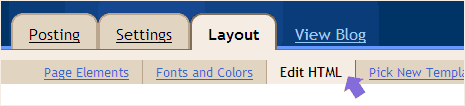
1. Login into your Blogger account. Then click on ‘Layout’ tab and then further click on ‘Edit html’ tab.
2. Before the template change you can download and save the existing template for easy restoration, as the case may be. Click on download full template button and save xml file on your computer.
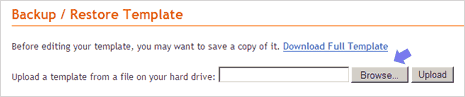
3.Now click on browse button and select the xml file of new blogger template and click on upload. If this method fails, you can try the following manual method to change blogger template.
Double click on xml file of blogger template. If it does not open, hold the shift key and then right click on XML file – select open in notepad. Then select whole content of that file, copy it and then paste it ‘edit template’ box.
Then click on ‘save template’ and click on confirm and save (optional). Open your blog and it will be sporting a spanking new Blogger template. Above procedure is for Blogger templates downloaded from 3rd party sites. Check this, if you want to change among in-built Blogger templates.
