At times Wireless internet setup can be real pain. For starters, recovering wireless network keys can be bigger pain. WirelessKeyView is a small utility that can be real handy to recover Wireless network Keys.
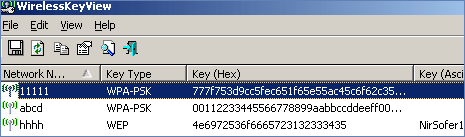
It recovers all wireless network keys (WEP/WPA) stored in your computer by the ‘Wireless Zero Configuration’ service of Windows XP and by the ‘WLAN AutoConfig’ service of Windows Vista.
It display the key in Hex and Ascii (if available) along with the adapter name and GUID. You can easily save all keys to text/html/xml file or copy a single key to the clipboard. Download WirelessKeyView [link] utility to never lose your wireless keys!
