Too many opened Windows cluttering your desktop workspace? Organize and easily access multiple application windows using free portable application “WindowsPager”. It allows upto 4 virutal desktops, each providing access to different opened application Windows. It works fine on Windows 7, Vista and XP operating system.
Use WindowsPager for multiple desktop workspace
1. Download WindowsPager & unzip file contents.
2. Browse to “WindowsPager” folder & double click icon to launch it.

3. You will notice 4 buttons on the left of system tray clock area.
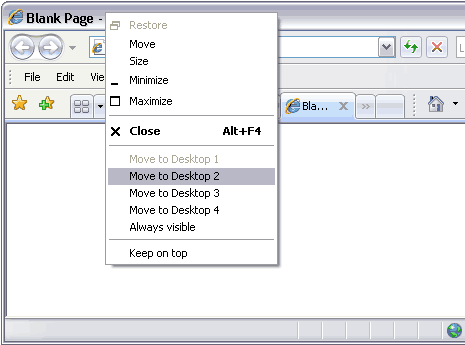
4. Right click on the title bar of any opened window and then click on “Move to Desktop 1”. Similarly you can move and arrange different opened windows in upto 4 virtual desktops.
5. You can access application windows in different virtual desktops by clicking buttons for the same on the taskbar. For sure one easy and quick way to toggle and browse lot of opened application Windows.
