 Are you one of many social networking lovers switching from Orkut to Facebook? Facebook has made it all easy for Orkut users to join Facebook and bring along Orkut friends to their new Facebook account. It has new feature that allows you to import Orkut friends to Facebook account and stay connected while on Facebook.
Import & Add Orkut friends to Facebook
1. Open this webpage & hit “click here to login in Orkut” button.
2. In the new window, login into your Orkut account.
3. Click Friends link at top of Orkut account window.
4. Click “Export Contacts”button at bottom right of Orkut webpage.
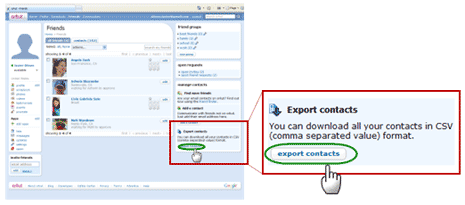
5. You will notice a yellow bar at the top. Right click on it and then click on “Download File” link.

6. You will get pop-up window, click save button to download contact file. Note: If you do not get pop-up window with save option to download file. repeat steps 3,4,5 and try again.
7. Once you have download contacts.csv file, goto this webpage.
8. Click browse to select contact.csv file & click find friends button.
Then see the suggested list of friends and add them to your Facebook account. Above procedure can bring your old Orkut friends into your new Facebook account and help you stay connected!
