Do you want to make Zune playlist to work in Winamp and other audio players? By default, Zune playlist ZPL is not compatible with other players. You need to convert it into M3U or PLS format for playback compatibility. You can easily perform this conversion using free portable tool ‘Zune Playlist Converter’.
Zune Playlist ZPL to M3U, PLS conversion
1. Download Zune Playlist Converter
2. Unzip & double click to launch the tool (no install required).
3. Select source Zune Playlist ZPL list.
4. Also select destination output file (M3U or PLS format).
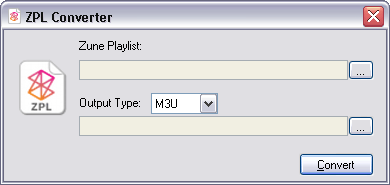
5. Click convert button to perform conversion. Final output playlist file should work in other audio players without any issue.
