Extract & Save all URLs from any webpage

 Filed As:Blogging, Tools
 ADVERTISEMENTS


Want to extract and save URLs from a specific webpage? Usually, one would go to source code of a webpage. Then start the manual, tiring process of copying each URL.

Well, you can do this in a single click without much of an effort using online tool ‘Link Extractor’. Just enter the URL of any webpage and click on ‘process’.

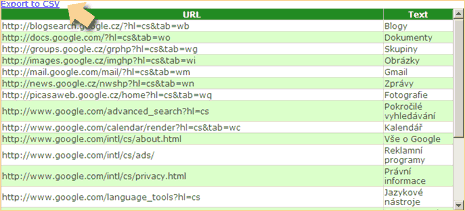
It will display complete list of URL found on that webpage. You can view URLs online or export and save them to a CSV file. Following is result for URLs found on google.com
Link extractor is very handy tool to grab and save links on a specific webpage. Do you know any other similar web app?



By Davinder on Friday, October 3rd, 2008

Share & Spread: Digg | Delicious | Share |
Loading


▼ Comments

3 Responses to “Extract & Save all URLs from any webpage”
  1. Amsterdam Girls says:

    Same results for me :(
    It returned an empty list

  2. RH in CT says:

    Having a page with a lot of links I wanted to save I hunted out this page and tried the application. It returned an empty list, despite the many, many links. Oh well.

▼ Add a Comment

Have your say, add a comment using following comment form. If you want an image to show with your comment, go get a gravatar!