Hmm… so you have something very personal and important, which should not be seen by anybody else! Well, not to worry here is simple solution. You can easily hide any folder in Windows XP.
Hidden folder will not be visible in Windows Explorer nor in dos prompt. You can hide all the folder that needs protection. This can be easily done using ‘Free Hide Folder’
This is a Free software, that hides any folder you wish to protect. With Free Hide Folder you will able to protect your files avoiding them to be being modified, seen or erased by other users.
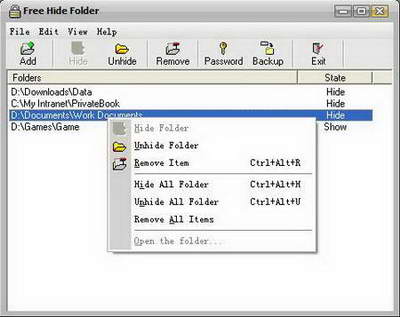
After you hide the folder, to unhide it open the application, provide the password and then unhide the folder. Works fine on Windows 9x/Me/NT/2000/XP/2003. Very light and zippy software.
Free Hide Folder: Read More – Download
Please note, this is a free software. In case you get prompt for registration, ignore it by clicking next button. Now you can hide some stuff from the bad world out there!!!
