Clearing internet browsing history is very important to free up hard disk space and to keep your browsing details private from other users. Firefox users can easily setup automatic deletion of internet history files and private data. Firefox has handy feature that allows clearing of browsing history every-time you close or exit the Firefox web browser. Once you setup this feature, just close the Firefox browser and all your internet history will be automatically deleted in the background (without you having to click anywhere).
Setup ‘Clear History when Firefox closes’
1. Open Firefox web browser on your computer. Then click on Firefox button and goto Options > Options. Now click on Privacy tab on the Options dialog box. You can find all required settings under “History” section on this box.
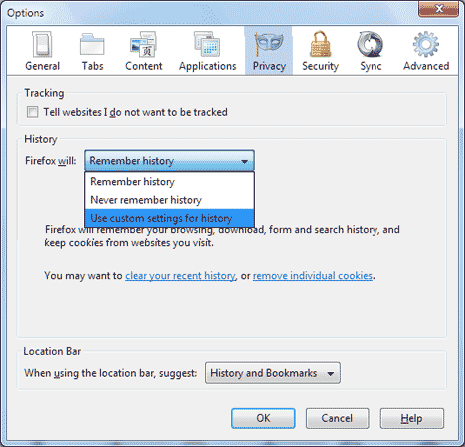
2. By default, “Remember History” option is selected in Firefox. From the dropdown, select “Use custom settings for History” option. Now you should see “Clear History when Firefox closes” option at the bottom.
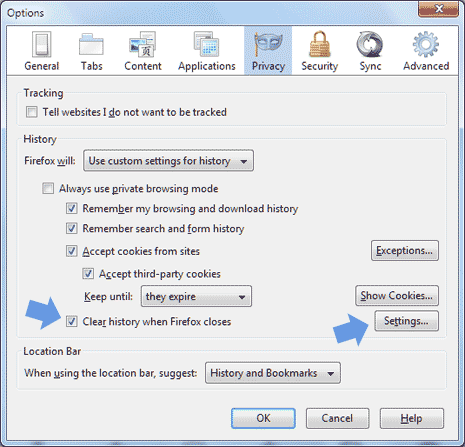
3. Click to check (with tick) “Clear History when Firefox closes” option. Also, click on Settings button next to this option. Here you can select which all history and data types should be cleared automatically like: browsing history, cookies, download history, active logins, cache, form and search history, saved passwords, site preferences and offline website data.
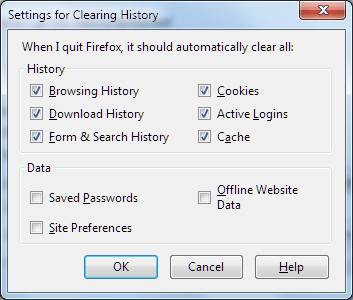
Once you have selected require history and data types, click Ok to close the box and again click OK to close the Options box. From now on, Firefox will automatically clear out all internet browsing history and data (selected types) when you close or exit it.
This option is very useful for users concerned about their internet history being discovered by other users. Since it is automatic routine, you having to manually delete history or forgetting to delete it – such cases do not arise. [Updated – Originally Published on Dec 16, 2008]
