Ideally we can only upload photos to Picasa Web Albums in our account. Now you can upload photos to albums in other user accounts or allow other users to upload photos in albums in your Picasa account. This is possible by using Collaborative albums feature and adding list of contributors / users allowed to upload photos.
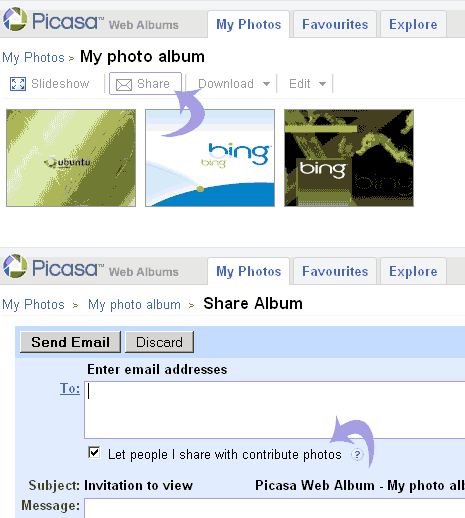
Make Picasa Web album collaborative
1. Open any Picasa Web album & Click Share button.
2. Check option “Let people I share with contribute photos”.
3. Edit or add users to share list displayed on the right.
Each allowed contributor can login into Picasa Web using their respective Google account and start uploading photos to collaborative album. Each user can only edit, rotate, add captions to photos they have uploaded.
You cannot upload images to collaborative album using Picasa software, it has to be done through web browser like Internet explorer (with limit of 5 images upload at one time). Start sharing common photos with collaborative albums feature.
