There are number of heavy loaded twiter clients (like Tweetdeck, bDule, Chirp) with over dose of graphics and wanting you to install Adobe Air, .Net and so on. Quitter is a dead simple portable twitter client that needs no install at all. Just download, unzip the file and double click on Quitter icon to launch in familiar looking black command prompt window.
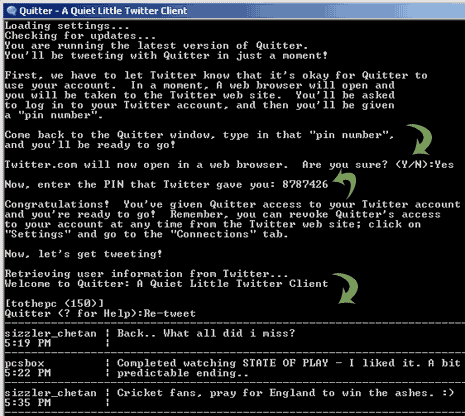
Steps to use Quitter in command prompt window
1. Press Y to auto open Twitter login window.
2. Enter your accounts details & login.
3. You will get PIN after successful login.
4. Type PIN number in Quitter command prompt window.
5. Press Enter to load your Twitter account details in Quitter window.
Download Quitter – carry this portable app in your USB drive and Twitter anywhere with ease. For sure most easy and simple looking Twitter client ever, what say?
