 Multiple users working on same document just became more easy at Google Docs. It has introduced “share folder” feature. Goto Create New > Folder to create new folder in your Google Docs account. Then drag and drop items like docs, spreadsheet into folder which can be further shared with group of selected users.
How to share folder in Google Docs
1. Create a new folder, goto Create New > Folder
2. Drag drop item in the new folder.
3. Right click Folder name, goto Share > Invite people
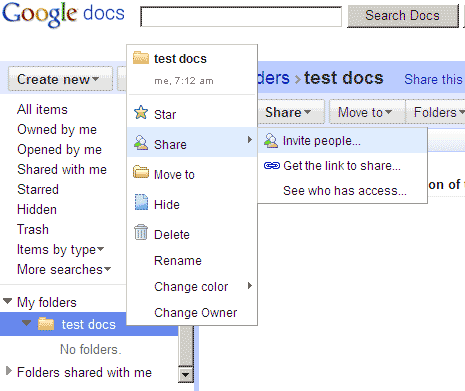
You can also click “Get the link to share” option to get code to share specific folder with other users. Use “See who has access” option to edit list of users with active access to specific folder and its contents. Also, any new item added to a shared folder is automatically available to users with active access. One handy feature to easily collaborate and work on documents in groups. [via Google Docs Blog]
