Access Blocked Files at Office with ‘Download at Work’

 Filed As:Tools
 ADVERTISEMENTS


Is downloading .exe or .zip files blocked on your office computer? Inspite of this restriction, do you still want to download an exe or zip file?
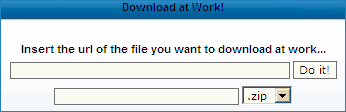
‘Download at Work’ web service should come handy to acheive this naughty task. It allows you to download any file by changing its file extension. Here is the quick procedure to get going with this handy web service:

  • Enter the URL of the file you want to download.
  • Chose name and different file extension (allowable in office).
  • Click on ‘Do it’ button and its all done.

‘Download at Work’ downloads requested file to its own server, renames it to another file extension so that you can download that file without any office restrictions.

As pointed by Ashish, in case your office administrator see lot of files getting downloaded from the same url , they might block it forever. Use it, till it works!



By Davinder on Monday, September 8th, 2008

▼ Comments

8 Responses to “Access Blocked Files at Office with ‘Download at Work’”
  1. Hi there,

    Thank you for your post, it will help me. I’m now waiting for google adsense aproval. I got your idea and at my lunch time I will try to create another domains.

  2. lalala2007 says:

    Thank you so much. This exactly what I was looking for. I found this post googling and found out this great website. I even suscribed in Google Reader. Good job!!

  3. sushil says:

    this kind of things affectionate me

  4. Hi there,

    i put this application also at http://bhtrance.com/dw if someone had it blocked…

  5. Gourav says:

    HI this is gourav…i find the link very useful…but have a problem downloadin .avi or .iso files….when i click on the link after DO IT….it opens a page showing some kind of html code….
    PLEASE HELP

  6. dlatwork says:

    Gourav,

    i think your url is wrong, if you found an html, probably you found an “not found” error, please check your link… thx

▼ Add a Comment

Have your say, add a comment...
If you want an image to show with your comment, go get a gravatar!


Comment moderation is enabled. Your comment may take some time to appear.

Join My Community at MyBloglog! Technology Blogs - Blog Catalog Blog Directory who's online