PC users can install multiple web browsers on their computer and use them simultaneously. While there can be multiple browser installed on Windows PC but there can be only one default browser. Any website url opened from external programs like Word document will open in the default browser. It is used as primary browser for opening website or webpage urls by Windows. So, if you have multiple browser like Google Chrome, Mozilla Firefox, Internet Explorer – make sure to select either one as default browser. Also, you can change default browser anytime using procedure explained below.
Set Google Chrome as default web browser
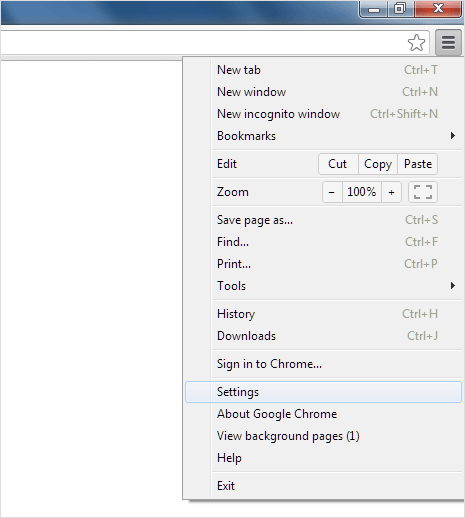
1. Open Google Chrome Settings page (chrome://settings/). Click on button at top right and then click Settings option in the menu. Scroll to bottom of the Settings page.
2. Click Make Google Chrome my default browser button under ‘default browser‘ section which reads “Google Chrome is not currently your default browser”.
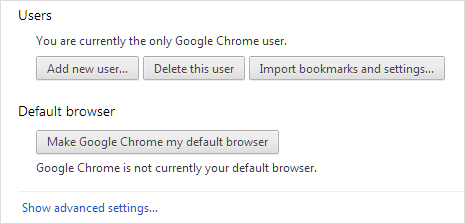
After making the above settings change, it will read “The default browser is currently Google Chrome.”.
Set Internet Explorer as default web browser
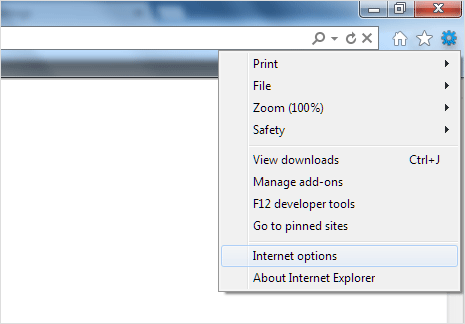
1. Open Internet Explorer browser, click on Gear button at upper right and then click Internet Options. It will open pop-up box for Internet Explorer setting options.
2. Click on the Programs tab and look for default web browser section at the top. Click Make Default button to set Internet Explorer as default browser.
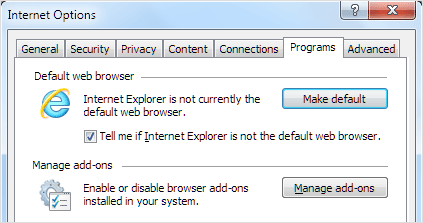
After making this change, the setting window will show message “Internet Explorer in the default web browser“.
Set Mozilla Firefox as default web browser
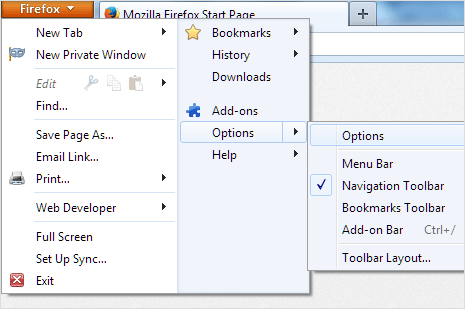
1. Open Firefox browser and then goto Firefox > Options > Options. This will open pop-up box showing all option settings of the Mozilla Firefox browser on your computer.
2. Under Advanced tab at the top, goto General tab and look for “System Defaults” section at the bottom. Click Make Firefox the default browser button.
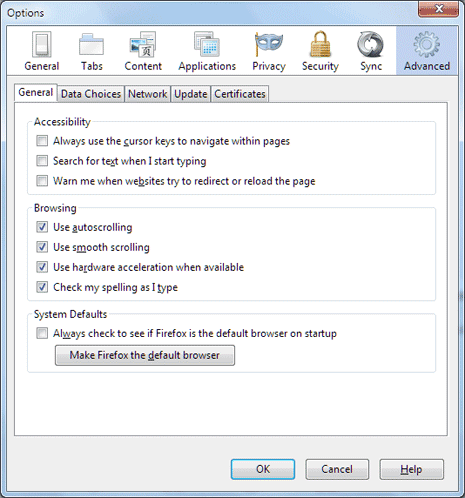
After this setting change, it will read “Firefox is currently your default browser“.
