Type text backward in reverse: text turner

 Filed As:Interesting, Software, Tips
 ADVERTISEMENTS


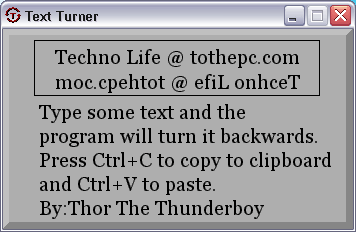
Want to freak out your Messenger and other online friends? Text Turner should come handy for some fun with text. It allows you to write any text in backward direction. It displays any typed text in reverse, which you can copy and paste anywhere for ‘text’ fun with friends.
text-turner-app

After the download, double click to launch the program. It is a portable tool and does not require installation. It shows typed text in reverse order as you type. Press Ctrl + C to copy the backward text, open any application and press Ctrl + V to paste the reversed text. Download Text Tuner for harmless yet freaky fun with online friends.



By Davinder on Friday, October 23rd, 2009

Share & Spread: Digg | Delicious | Share |
Loading


▼ Comments

2 Responses to “Type text backward in reverse: text turner”
  1. Xsrv says:

    The text pasting function doesn’t work right. Also, the text area is just tiny.

  2. Jenna Jameson says:

    looks like a cool program, but i think better than a download is to just do it online… like upsidedowntext.com and millions of other sites too that don’t require a download. but anyways, sometimes it’s nice to have a program so u dont need to be connected to the internet, so kudos to u!

▼ Add a Comment

Have your say, add a comment using following comment form. If you want an image to show with your comment, go get a gravatar!