Google can dig out lot of stuff including public phone numbers. Google Phonebook can help you find US public business and residential telephone numbers. Open Google and type phonebook: keyword
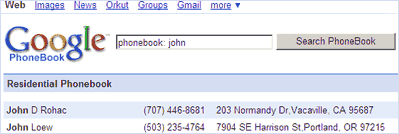
You can use any keyword depending your requirement. For example, check phonebook results for John by using [phonebook: john] on Google search.
Besides the phone number, it also list relevant address and link to check geographical details via Google Maps. It does show up loads of results for common keywords.
However, some telephone numbers could be outdated and could be of no use. In case Google has indexed your telephone number that should not be there, you can request for removal using link at the bottom of the webpage.
Give Google Phonebook a test drive and check how many relevant telephone number of your relatives and friend in US – can you dig up?
