More and more internet users are getting familiar with the concept of RSS feeds and its uses. This has resulted in number of online and offline services to help in better RSS Management. Feedburner and Feeblitz lead the way in basic RSS Management services. Sometimes you may want to do more than just reading contents of a RSS feed. While there are tools to filter RSS feed content, tools to mix, blend and Mash-up multiple RSS feeds are more important. They help you grab multiple RSS feeds and create a single customized master RSS feed. Here are 10 online tools and scripts you can use for combining multiple RSS feeds.
Online Tools for combining multiple RSS feeds
1. ChimpFeedr is very simple no strings attached service for mashing up multiple RSS Feed. To get started paste URLs of multiple RSS feeds using “Add Feed” button. Check or uncheck “Resize Images” option and click the “Chomp Chomp” button.
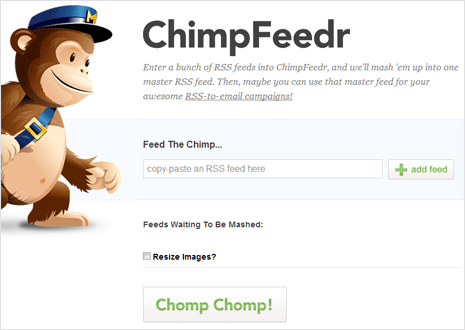
You should see URL of generated master RSS feed containing contents of all specified RSS feeds. This tool comes from MailChimp email marketing service. Originally made available for creating master RSS feed for your RSS-to-email campaigns through MailChimp service but you can use it for other purposes also.
2. Yahoo Pipes – Problem with online feed blenders is – they come and go. Yahoo Pipes is most stable option for simple reason, it is from YAHOO! It can be bit confusing for a newbie, however once you get hold of things – it works like charm. It allows you to combine many feeds into one, then sort, filter and translate it.
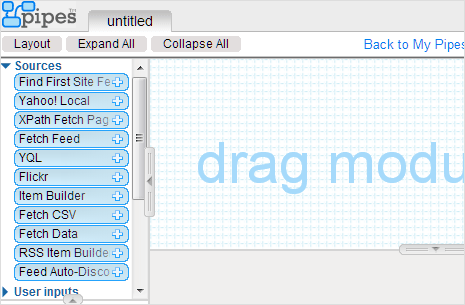
There are number of enhancement features like using power widgets and badges on your website. Once you have created Pipe (a mash-up of multiple feeds), you can the output of in various formats like RSS, JSON, KML and more. You can also browse Pipes created by other users. This tools require Yahoo (Mail) account login for usage.
3. RSS Mix – Mix any number of RSS feeds into one unique new feed. RSS Mix website provide an easy web based interface for RSS mixing. To create a new RSS Mix, copy and paste the URLs of the existing source feeds into the box below and hit Create button.
4. Feed Killer – It is another simple online tool for combining multiple RSS feeds into one single RSS feed. Besides adding multiple RSS feed URLs, you can select number of stories from specific feeds that should feature in your final master feed.
5. Feed Roll – It features simple online Feed Combiner tool allowing you to package different RSS Feed (upto 5) from various websites or sources. You can select number of elements that should be displayed from specific feed in the final RSS feed.
6. Feed Stitch – As the name suggests, this online service helps you stitch multiple RSS feeds from various sources into one single powerful master feed. It supports HTML, RSS, JSON allowing you easy publishing of generated feed contents.
Scripts for creating own RSS feed combiner & masher
7. Feed Combine – It was popular service to quickly combine RSS Feeds but now is only available in back-end script format. Due to excessive wrong usage, front end of the service is closed now. However, users can download the open source script and install it on their own server for custom usage.
8. RSSMesh –The rssMesh.php script allows you to produce an RSS feed by taking the latest items from multiple feeds. The RSSmesh configuration is controlled by a configuration file for each feed to be produced. You need to have technical know-how of working with scripts for using this method of combining multiple RSS feeds.
9. MagpieRSS – It is a popular PHP library for parsing RSS feeds. It is an XML-based (expat) RSS parser in PHP that is compatible with RSS 0.9 through RSS 1.0 (also parses RSS 1.0’s modules, RSS 2.0, and Atom).
10. Simple Pie – It is a free open source code library written in PHP for easy management. It is an easy to use API that handles everything when it comes to fetching, caching, parsing, normalizing data structures between RSS and Atom formats.
Popular RSS combiners Not Available now
11. RSS Mixer – [Not available, rssmixer.com] Just enter the multiple RSS feed URLs and title for the resultant feed and click on Mix it button. You will get RSS feed mixed up of all the individual RSS feeds. You can use resultant RSS feed in number of formats like: Apple Dashboard Widget, Web Widget to embed in a webpage, an iPhone formatted version of your mix etc.
12. FeedBlendr – [Services is closed now] Very easy to use online service for blending or combining of multiple feed. Enter the URLs of feeds that you want to combine and Click on Blend Your Feed button. No Registration or download is required to blend feeds. You get output in the form of: RSS/Atom output, HTML link, (.m) link, OPML output and Javascript code.
13. FeedTwister – [Not available, FeedTwister.com] It allows you to mix your favorite feeds and show their latest posts on your website.Create as many lists of feeds as you want and add up to 50 feeds per list. You can also assign an image to each feed and order posts by date or title. Limit the posts shown and establish a posts per source maximum.
14. BlogSieve – [Not available, BlogSieve.com] It is a free web-based tool that creates new feeds by filtering, merging and sorting existing feeds. The BlogSieve engine accepts virtually every (valid) feed format, processed results are then exported into any feed format you choose.
15. BlastFeed – [Not available, BlastFeed.com] It is an on-line service that lets you aggregate, remix and filter RSS feeds. And Blastfeed can immediately notify you of any results of such filtering. Blastfeed will only collect items that match your criteria in each feed. The results will be amalgamated into a single file and sent to you by email, Instant Messaging or as a new RSS feed, when and where you want it.
16. FrankenFeed – [Available but doesn’t work, biggu.com/frankenfeed] It is an open source application written using Ruby on Rails. This application can merge multiple RSS or ATOM feeds (xml) into a single master feed. The idea is to allow a power RSS or ATOM user to manage a single feed for a novice RSS or ATOM user.
Do you know any other RSS combiners, mixers and mashers? Please share with us by adding a comment [Updated in Jan 2013]
