We have seen number of tools and ways to convert an image to icon format. For example, ImagIcon utility can convert images of different formats like JPG, PNG, BMP into ICO icon format. Alternatively, you can perform PNG to ICO conversion online at ConvertICO. Checkout ZylBmp2Ico utility for BMP image to ICO conversion.
BMP to ICO conversion with ZylBmp2Ico
1. Download ZylBmp2Ico program & install it.
2. Launch the program (works fine on Windows 2000/XP/Vista/7).
3. Goto File > Open and select BMP image file on the computer.
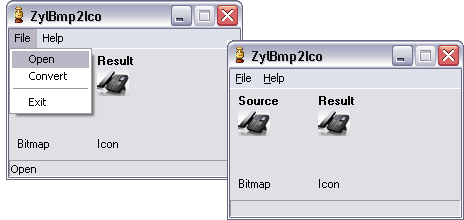
4. Then goto File > Convert and enter name of icon file. Selected BMP image will be saved in ICO icon format with specific filename. Quick and easy, isnt it?
