Desktop icons provide quick access to files, folders and application programs on Windows PC. While icons on desktop are useful, too many icons can make desktop look cluttered and un-organized. Few users like clean and organized desktop look with full view of a desktop wallpaper. One can easily hide and make all desktop icons disappear on any Windows computer (be it Windows 8, 7, Vista or XP). Ofcourse you can restore, unhide and show desktop icons anytime as per requirement.
Hide desktop icons using Windows in-built feature
1. Newer version of Windows like Windows 8 and 7 has in-built feature that allows you to hide all desktop icons anytime. Right click on empty space on the desktop screen.
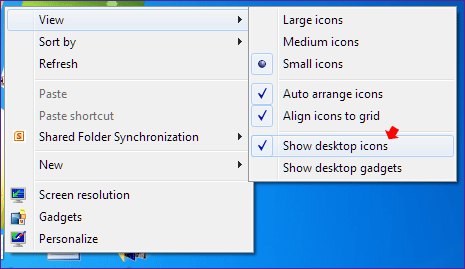
2. Then point on the View option and then click on Show Desktop Icons option (no-tick). This will instantly hide all desktop icons on the desktop screen. You can check the “Show Desktop Icons” option to make icons show or appear again on the desktop.
One click to hide Desktop icons using EmptyDesk
1. If you prefer using utility programs, then EmptyDesk should work like charm. Once you download EmptyDesk program, unzip it and launch the program. Click the Clear Desktop button to hide all desktop icon in a single click. This runs fine on Windows 7, Vista and XP computers.

2. You can make desktop icons visible again by clicking Show Desktop button. EmptyDesk provide simple and straight-forward method to hide and un-hide desktop icons quickly. So next time you want to take screenshot of your Windows desktop without the clutter of icons, use this small utility to clean desktop from icons and take a neat screenshot.
Hide desktop icons automatically when PC is idle
For privacy reasons, you may want to hide all desktop icons when moving away from the computer for some period. There is an excellent utility we have reviewed that allows you to automatically hide desktop icons due to inactivity (when PC is left idle). Once you come back to the computer, a touch of mouse or keyboard restores all desktop icons back on the desktop screen.
