Facebook profile and privacy settings change all the time. There are few basic privacy settings that you should control like hiding profile from Google and other search engines for your account. You can also enforce strict control and prevent revealing of Email ID associated with your Facebook profile. You can hide email ID from all or specific Facebook friends.
Restrict & hide Email ID of Facebook account
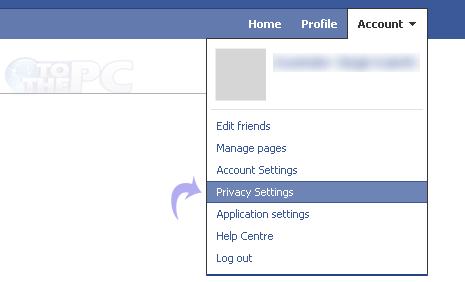
1. Login into your Facebook account. Then open Privacy Settings of your Facebook profile by going to Account > Privacy Settings at top right.
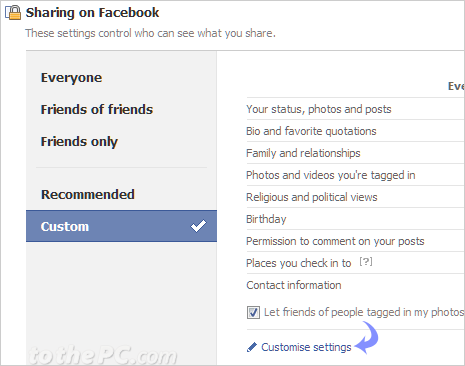
2. This will open “Choose your privacy settings” page with basic listing of choosen privacy settings of your Facebook profile. Here click on ‘Customise Settings’ option at bottom middle.
3. Now scroll down the ‘Customise Settings’ webpage and look for “Contact Information’ section at bottom with listing of your address, IM screen name, telephone number and email address.
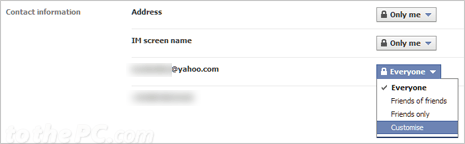
4. Click button with down arrow next to your email ID and click Custom option. In the new pop window, select ‘Only Me’ option under “Make this visible to”. Click ‘Save Settings’ button to confirm change.
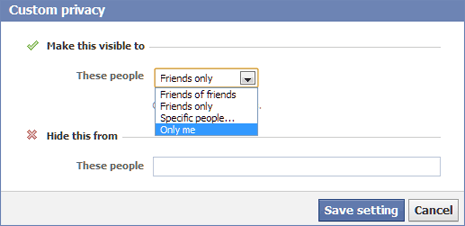
Make sure ‘Only Me’ option is listed to prevent visibility of your email address to any Facebook friend or any other person on Facebook.
Video How-to: hide email address on Facebook profile
Similarly, you can hide telephone number, address, IM screen name information stored in your Facebook profile using above procedure. [Updated article – originally published on May 10, 2010]
