We have seen number apps to see lyrics for current songs being played in Winamp music player, iTunes app and Zune software. Now you can also view lyrics while watching Youtube videos. “Youtube Lyrics” is a userscript that pulls lyrics data for the current Youtube video from number of lyrics websites.
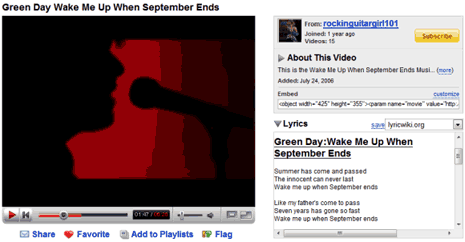
As seen in above screenshot, Lyrics are displayed in a box below video information box. It searches almost 11 different lyrics websites. You can select specific lyrics website using drop down box and view lyrics cotent from that website. For sure on cool way to spice up Youtube video watching experience – grab Youtube Lyrics.
Note – To use UserScripts, you need to first install Greasemonkey plugin in Firefox browser. After install, restart Firefox and then install Youtube Lyrics userscript.
