Want to quickly create thumbnail images? Quick Thumbnail program makes this all easy: reduce size of images to desired level in batch mode. It supports easy drag drop of images in the application windows. You can set the final reduced dimensions for an image and this program will reduce size of selected images.
Use Quick Thumbnail to reduce image size
1. Download Quick Thumbnail application, unzip it (rar file download).
2. Launch the applicaiton by double clicking program icon.
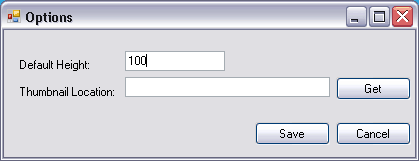
3. Goto Edit > Options and enter default height for thumbnail images.
4. Then drag and drop images in the application window.
5. Click Make button to create thumbnail images of selected photos.
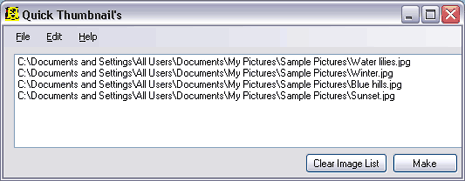
You can see thumbnail images in thumbnail folder inside the folder containing original images. It is very handy application for quick and basic thumbnail creation. Though, it does lack on advanced image resizing options – still good enough!
